Translate

显示标签为“caterpillar”的博文。显示所有博文

2026年5月19日星期二

Caterpillar Engine Ignition Failure, Smooth or Unstable Operation Troubleshooting

 Note: If the fault is intermittent and does not repeat, please refer to the "Intermittent Low Power or Power Cut-off" section. If the fault is continuous and recurring, continue with this procedure.

  (1) Possible Causes. 

1) Diagnostic Codes. 

 2) Electrical Connectors. 

 3) Cold Mode. 

 4) Throttle Signal. 

 5) Injection Drive Pressure. 

 6) Individual Injectors. 

 7) Fuel Supply. 

 8) Intake and Exhaust Systems.

 (2) Recommended Actions. Note: If the fault only occurs under certain operating conditions (high idle, full load, and engine operating temperature, etc.), test the engine under these conditions. Diagnosing and troubleshooting the fault symptoms outside of these conditions can be misleading.


  1) Diagnostic Codes. Check the Caterpillar Electronic Technology (Cat ET) for self-diagnostic codes. Before continuing this procedure, troubleshoot and resolve all self-diagnostic codes. 

 2) Electrical Connectors. Check that ECM connectors J1/P1 and J2/P2, as well as the unit injector connectors, are installed correctly. 

  Caterpillar ET 2026A & 2019C Electronic Technician Diagnostic Software Download and Installation 

 3) Cold Mode. Use Cat ET to verify that the engine has exited cold mode. Operating in cold mode can cause engine instability and limit engine power. 

4) Throttle Signal. Monitor the throttle signal on Cat ET. Verify that the throttle signal is stable from low idle to high idle. 5) Injection Drive Pressure.

  ① Check the engine oil level. Engine oil supplies the injection drive pressure circuit. The engine oil level must be maintained at the correct level for fuel injection. Note: If oil has been drained from the unit injector hydraulic pump, the pump must be primed. 

 ② If the engine has recently undergone maintenance, there may be air in the injection drive pressure circuit. 

① Fully warm up the engine and operate it under load to purge air from the fuel injection drive pressure circuit.

  ② Compare the actual drive pressure on the CAT ET with the required drive pressure. If the two readings do not exceed 2000 kPa during the fault, the problem is not in the fuel injection drive pressure circuit. ③ Check the seal on the fuel injection drive pressure control valve. If the seal is faulty, replace it and repeat step 

③. ④ Check the wiring harness connected to the fuel injection drive pressure control valve for open circuits and/or short circuits. 

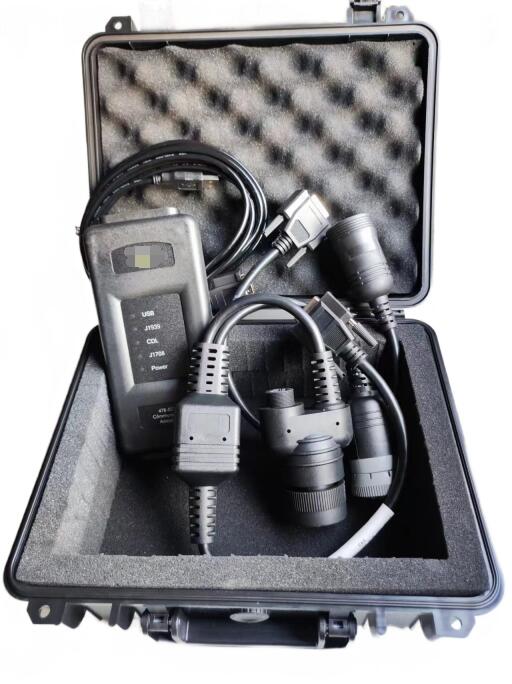
  CAT Comm Adapter3 478-0235 Diagnostics for Caterpillar

 ⑤ Measure the coil resistance on the fuel injection drive pressure control valve. If the coil resistance exceeds (10 ± 5) Ω, replace the fuel injection drive pressure control valve. Note: Leaking liquid under pressure, even at the size of a pinhole, can penetrate human tissue, causing serious injury or even death. If liquid sprays into the skin, seek immediate treatment from a doctor familiar with this type of injury.

 Always use a wooden board or cardboard when checking for leaks.

 ⑦ Perform a fuel injection drive pressure overload test using the ET. If the fuel injection drive pressure is low, there may be a leak in the high-pressure fuel supply circuit.

 a. Remove the plug from the fuel injection drive pressure control valve and the unit injector connector. 

 b. Stop the unit injector operation using the ET and/or engine stop switch. 

 c. Remove the valve cover. d. While checking for leaks at the drain port of the unit injector connector and the bridging cylinder block seal, crank the engine. 

 e. Repair any leaks and repeat step ③. 

 f. If the fuel injection drive pressure is still low during cranking, the pump compensator flow controller may be faulty. Replace the pump compensator controller assembly and repeat step ③.

  6) Unit Injector. 

 ① Perform an injector solenoid coil test on a Cat ET to ensure all injector solenoid coils are energized by the ECM. 

  7) Fuel Supply. 

① Check the fuel lines for the following problems: throttling, broken lines, and clamped lines. If a problem is found, repair and/or replace the fuel line. 

 ② Check the fuel tank for foreign objects that could block the fuel supply. 

 ③ When performing any procedure such as replacing the fuel filter, repairing the low-pressure fuel supply circuit, or replacing individual injectors, check the low-pressure fuel supply system for air. 

 ④ Purge air from the low-pressure fuel supply circuit. Note: The sight glass in the low-pressure fuel supply line can help diagnose air in the fuel. 

⑤ Check the fuel quality. If the temperature is below 0°C, check for solidified fuel (waxy substances). 

 ⑥ Check the fuel pressure when starting the engine. If the fuel pressure is low, replace the fuel filter. If the fuel pressure is still low, check the following components: fuel pump, fuel pump coupling, and fuel pressure regulating valve.


8) Intake and Exhaust System 
① Check the air filter throttling indicator. Clean or replace any clogged air filters. 
② Check the intake and exhaust systems for blockages and/or leaks.

 ② Perform a cylinder shut-off test on a Cat ET to identify any cylinders that are not firing.

   12.2021 Caterpillar ECM ECU Flash Files Full Set Download


2026年5月18日星期一

Troubleshooting Caterpillar Starter Failure

  (1) Possible Causes 

 Caterpillar ET 2026A & 2019C Electronic Technician Diagnostic Software Download and Installation 

1) Diagnostic Codes 

2) Event Codes 

 3) ECM Power Supply

 4) Oil Level 

5) Starter Assist Devices 

6) Engine Stop Switch 

7) Engine Speed/Timing 

8) Injection Drive Pressure

 9) Individual Injectors 

10) Fuel Supply

 11) Combustion Fault


 (2) Recommended Actions. 

 1) Diagnostic Codes, Event Codes, and ECM Power Supply. Some diagnostic codes and/or event codes can prevent the engine from starting. Connect the Caterpillar Electronics Technology (Cat ET) and check for any current and/or recorded codes. Before continuing this procedure, troubleshoot and resolve any existing codes. Note: If the Cat ET cannot communicate with the ECM, the problem is most likely with the power supply to the ECM; see the "Testing the Power Supply Circuit" section. 

 CAT Comm Adapter3 478-0235 Diagnostics for Caterpillar

 2) Oil Level. Check the engine oil level. Add oil if necessary. Note: Engine oil supplies the fuel injection drive pressure circuit. Maintaining the correct engine oil level is necessary for fuel injection.

  3) Starting Assist Devices.

 ① Intake Air Heater. Verify that the intake air heater is set to the ON position. 

 ② Engine Stop Switch (if equipped). The engine stop switch should be in the OFF position. Use the Cat ET to check the status of the stop switch. When parking, the key switch should be turned to the OFF position for at least 15 seconds before restarting the engine.


 Note: If the Cat ET cannot communicate with the ECM, the problem is most likely with the power supply to the ECM. Please refer to the "Testing the Power Supply Circuit" section.

 4) Engine Speed/Timing.

 ① Rotate the engine and observe the engine speed on the Cat ET status screen. If the Cat ET displays Or/min, please refer to the "Testing the Engine Speed/Timing Sensor Circuit" section. Note: On the first rotation, the engine status may show an abnormal engine speed signal. Once the ECM can calculate the engine speed from the signal, this information will be replaced by the engine speed. 

 ② Verify that the timing reference gear is installed correctly. If the gear is installed backwards, the engine will not start. Check the alignment between the crankshaft and camshaft drive gears. If necessary, correct the alignment and/or replace the drive gears.


 5) Injection Drive Pressure. 

 ① Rotate the engine and monitor the injection drive pressure and the output pressure of the injection drive pressure control valve. If the pressure output is not lower than 6MPa, the high-pressure fuel system is considered to be operating normally. 

 ② If the displayed pressure is higher than the current pressure, disconnect the fuel injection drive pressure sensor and try starting the engine. If the engine starts, refer to the "Testing the Fuel Injection Drive Pressure Sensor" section.

 6) Individual Injectors. Perform an "Injector Solenoid Coil Test" on a Cat ET to determine if all injector solenoid coils are energized by the ECM.


7) Fuel Supply. 
 ① Visually check the fuel level. Do not rely solely on the fuel gauge. Add fuel if necessary. If the engine runs out of fuel, air must be purged from the fuel system. 
② Check the fuel lines for the following problems: throttling, collapsed, and clamped lines. If any fuel lines are faulty, repair and/or replace them. 
③ Check the fuel tank for foreign objects, which can block the fuel supply. 
 ④ If any of the following procedures have been performed: replacing the fuel filter, repairing the low-pressure fuel supply circuit, or replacing the individual injectors, check for air in the low-pressure fuel supply system. Note: The sight glass in the low-pressure fuel supply line helps diagnose air in the fuel. Note: Do not crank the engine continuously for more than 30 seconds. Allow the starter motor to cool down for 2 minutes before cranking the engine again. 
 
 ⑤ Bleed the air from the low-pressure fuel supply circuit. 
 
 ⑥ Check the fuel quality. If the temperature is below 0°C, check for solidified fuel (waxy substances). 
 
 ⑦ While cranking the engine, check the fuel pressure after the fuel filter. If the fuel pressure is low, replace the fuel filter. If the fuel pressure is still low, check the following: fuel pump, fuel pump coupling, and fuel pressure regulating valve. 
 
 8) Combustion problems. Check for combustion problems.

2026年5月17日星期日

Troubleshooting Steps for Caterpillar Electronic Service Tool (Caterpillar Adapter) Not Communicating with ECM

  (1) Possible Causes

Caterpillar ET 2026A & 2019C Electronic Technician Diagnostic Software Download and Installation 

 1) Communication Adapter Configuration 

2) Electrical Connector 

 3) Communication Adapter and/or Cable 

4) Power Supply to Service Tool Connector 

5) Caterpillar Electronic Technology (Cat ET) and Related Hardware 

 6) Power Supply to ECM

 7) Personal Module (Flash File) 8) Caterpillar Automatic Data Transmitter

  (2) Recommended Actions. Start the engine. If the ECM does not communicate with Cat ET after the engine starts, continue with this procedure. If the engine cannot start, refer to the "Rolling Start Engine, but Engine Does Not Start" section. If rolling start is ineffective, refer to the "Engine Cannot Roll Start" section.

 1) Communication Adapter Configuration 1) **On the Cat ET:** ① Select "Preferences" from the "Utilities" menu.

CAT Comm Adapter3 478-0235 Diagnostics for Caterpillar

  ② Confirm that the correct "Communications Interface Device" has been selected. 

③ Verify that the correct communication adapter "Port" has been selected. Note: The most commonly used port is "COM1". 

④ Check if any hardware and communication adapters are using the same port. If any device is set to use the same port, exit or close the software program for that device.

 2) **Electrical Connectors:** Check that ECM connectors J1/P1 and J2/P2 and the service tool connector are installed correctly. 

 3) **Communication Adapter and/or Cable:**

 ① If using Communication Adapter II, confirm that the communication adapter's microprogram language and driver files are up-to-date. If the microprogram language and driver files are incompatible, the communication adapter will not be able to communicate with the Cat ET. 

② Disconnect the communication adapter and cable from the service tool connector. Then reconnect the communication adapter to the service tool connector. 

③ Verify that the cable used between the communication adapter and the service tool connector is correct. 4) Power supply to the service tool connector. Check the battery voltage between terminals A and B of the service tool connector. If the communication adapter is not powered, the display on the communication adapter will be blank.

 5) Caterpillar Electronics Technology (Cat ET) and related hardware. To verify the Cat ET and related hardware are functioning correctly, connect the Cat ET to another engine. If the other engine also experiences the same problem, check the Cat ET and related hardware to determine the cause of the fault.

 12.2021 Caterpillar ECM ECU Flash Files Full Set Download

6) Power supply to the ECM. Check the power supply to the ECM; see the "Testing the Power Supply Circuit" section. Note: If the ECM does not receive battery voltage, it will not be able to communicate. 
7) Personalization Module (Flash File). Verify that the correct personalization module is correctly installed in the ECM. Note: The personalization module in a new ECM is blank. The engine will not start or communicate until the personalization module is flashed; see the "Flash Programming" section.
  8) Caterpillar Automatic Data Transmitter. For diagnosing and troubleshooting faults in Caterpillar Automatic Data Transmitters, please refer to the "Testing CAT Data Transmission Circuits" section.


2026年3月24日星期二

How to handle the problem of elevated oil temperature in the loader's transmission oil pan?

 What are the possible causes of elevated oil temperature in the loader's transmission oil pan due to a large amount of aluminum shavings or metal shavings?

Doosan Diagnostic Tool UVIM Support Doosan Excavators High Quality 

(1) A large amount of aluminum shavings in the oil pan indicates mutual wear between the torque converter's working wheels, resulting in reduced transmission efficiency and overheating of the working oil. 

 (2) A large amount of copper shavings in the oil pan indicates friction or slippage between the driving and driven friction plates. The transmission oil level and shift pressure should be checked. If normal, the problem is likely due to improper assembly or deformation of the driving and driven friction plates.


CAT Comm Adapter3 478-0235 Diagnostics for Caterpillar

 (3) Iron shavings in the oil pan indicate slippage of the overrunning clutch. When the loader transitions from high speed with light load to low speed with heavy load, there is a metallic friction sound in the transmission, and the machine lacks power.

 (4) Bearing fragments in the oil pan generally indicate bearing damage in the dual-transmission assembly. The situation should be assessed, and the damaged parts should be disassembled, inspected, and replaced. If the above phenomena are found, a judgment should be made based on the specific situation. The torque converter or gearbox should be disassembled and the damaged parts replaced. Do not continue to use it.

Diagnostic Tool Kit for Bobcat Wood Skid Steer Loader Excavator – High Quality 

2026年3月3日星期二

How to diagnose and troubleshoot the Caterpillar 311B Excavator 2LS MID 161 - CID 0168 - FMI 00 fault message?

 This code is generated when the diagnostic circuitry within PL522 and 523 detects a system voltage higher than 32 VDC. Possible causes of this fault include: 

 CAT Comm Adapter3 478-0235 Diagnostics for Caterpillar

CAT Comm Adapter3 478-0235 Diagnostics for Caterpillar

 • A faulty charging system component. 

 • A faulty wiring harness conductor. 

• A faulty PL522 or 523. A module fault is unlikely.

Note: Determine if a battery charger or welding machine is being used on the machine. Disconnect the charger or welding machine from the machine. Recheck for diagnostic codes. 

 Test Procedure 1. Check the system voltage at the 70-pin connector of PL522 or 523.

A. Start the engine and run it at high idle for 5 to 10 minutes. 

 B. Measure the system voltage between the "No Switching Power" and "Ground" contacts. Pin 52 is the "No Switching Power" terminal, and pin 65 is the "Ground" terminal. 


Caterpillar ET 2026A & 2019C Electronic Technician Diagnostic Software Download and Installation

Expected Result: Voltage is 11 VDC to 32 VDC. 

Result: • Normal - Voltage is 11 VDC to 32 VDC. PL522 or 523 should not record this diagnostic code. 

Repair: Clear the diagnostic code from PL522 or 523 using a Caterpillar Electronics Technician (Cat ET). If the voltage is normal and PL522 or 523 records this diagnostic code again, replace PL522 or 523. Before replacing PL522 or 523, please contact your Caterpillar technical communicator.

  Stop • Abnormal - Voltage is not 11 VDC to 32 VDC. Proceed to Test Step 2.

Test Step 2. Check the alternator. 

  A. Run the engine at high idle for 5 to 10 minutes. 

 B. Measure the voltage output at the battery terminals.

  Expected result: The voltage should be below 32 VDC.


12.2021 Caterpillar ECM ECU Flash Files Full Set Download

 Result: • Normal - Voltage below 32 VDC. The battery may be faulty. Proceed to test step 3.

  • Abnormal - Voltage above 32 VDC. Troubleshoot the alternator. The voltage regulator may be faulty. If no issues are resolved, proceed to test step 3. 

  Test Step 3. Check the battery voltage.

Turn the ignition switch to the off position. Measure the voltage at the battery terminals.  

Expected result: The voltage should be below 32 VDC.

Result: • Normal - Voltage below 32 VDC. Proceed to test step 4. 

    Result: • Yes - Other "CID 168 FMI 00" diagnostic codes can be found on other Electronic Control Modules (ECMs). Repair: Clear the fault if all of the following occur: 

Monitor the module and the machine for any further faults. If the fault recurs, the PL522 or 523 module is not faulty because other electronic control modules are displaying the same fault. Recheck the system voltage. 

Stop • No - No other "CID 168 FMI 00" diagnostic codes can be found on other ECMs. Repair: Clear the fault if all of the following occur: 

 ◦ No fault was found in the charging system. 

 ◦ No fault was found in the wiring.

  ◦ The fault has recurred several times.  

Monitor the module and machine for further faults. If the fault recurs, the PL522 or 523 module may be faulty. The PL522 or 523 should be replaced. Refer to System Operation, Troubleshooting & Repair, Testing & Adjustment, "Electronic Control Module (ECM) - Replacement". After replacing the PL522 or 523, recheck the system and check the status of the diagnostic codes.

  Stop

Caterpillar 18 Digits Factory Password Calculator One-Time Calculate Service 

2025年10月27日星期一

How to release hydraulic pressure in multiple hydraulic circuits on a 320D2 excavator

                                                WARNING:

 Hot oil or hydraulic fluid pressure can cause personal injury. Hydraulic fluid pressure remains in the hydraulic system after the engine is stopped. Failure to relieve pressure before servicing the hydraulic system can result in serious injury. When removing hydraulic system components or lines, ensure all work tools are lowered to the ground and the hydraulic fluid is cool. Remove the filler cap only after the engine is stopped and the filler cap is cool enough to touch with bare hands.


  CAUTION: During inspection, maintenance, testing, adjustments, and repairs, care must be taken to ensure that any drained fluid is contained. Before opening any compartments or disassembling any components that contain fluids, have a suitable container available to collect the fluid.

 For tools and supplies suitable for collecting and containing fluids on Cat products, refer to the specialized publication, NENG2500, "Dealer Service Tool Catalog."

Dispose of all fluids in accordance with local regulations and requirements. 

1 Perform the following procedure to relieve hydraulic pressure from multiple hydraulic circuits in the main hydraulic system. 1. Park the machine on level ground.


 CAT Comm Adapter 3 478-0235 Diagnostics for Caterpillar

  2. Fully retract the boom cylinder linkage. Adjust the bucket so that it is parallel to the ground. Lower the boom until the bucket is level on the ground. Refer to Figure 1.

 3. Shut off the engine.

 4. Turn the engine start switch to the on position, but do not start the engine.

 5. Place the hydraulic start control lever in the unlocked position.

 6. Move the joystick or pedal to the full position for only the hydraulic   circuit requiring service. This will relieve high pressure in that circuit only. This will also relieve any pressure that may be present in the pilot hydraulic circuit. Note: If the hydraulic circuit requiring service requires activation of an operating switch, activate the appropriate operating switch for that circuit.

 7. Place the hydraulic start control lever in the locked position. 

 8. Start the engine. 

 9. Place the hydraulic start control lever in the unlocked position. Do not move any joystick or pedal from the neutral position during this step. Do not activate any switches during this step. 

10. Return the hydraulic start control lever to the locked position. 

11. Shut off the engine. 

12. Repeat steps 4 through 11 for any other hydraulic circuits requiring service. 

13. After relieving the hydraulic pressure in each targeted hydraulic circuit, return the hydraulic start control lever to the locked position. 

 14. Turn the engine start switch to the off position. 

 15. Slowly loosen the filler plug on the hydraulic tank to relieve pressure. Keep the filler plug loose for at least 45 seconds. This will relieve any pressure that may be present in the return hydraulic circuit. https://127.0.0.1/sisweb/sisweb/techdoc/techdoc_print_page.jsp?returnurl=/sis... Friday, October 26, 2018 

16. Tighten the filler plug on the hydraulic tank to the specified torque. 

17. The pressure in the multiple hydraulic circuits requiring maintenance has now been relieved, and the lines and components can be disconnected or removed from these hydraulic circuits.


 12.2021 Caterpillar ECM ECU Flash Files Full Set Download

2025年10月20日星期一

How to troubleshoot Caterpillar 311B Hydraulic Excavator MID 161 - CID 0168 - FMI 01

 Conditions that Generate This Code: This diagnostic code is logged when the PL522 and 523 modules detect a battery voltage below 11 VDC. Test Procedure 1. Check the system voltage at the 70-pin connector on the PL522 and 523 modules. Start the engine and run it at high idle for 5 to 10 minutes. Measure the system voltage between the "Unswitched Power" and "Ground" contacts. Pin 52 is the "Unswitched Power" terminal, and pin 65 is the "Ground" terminal.

 Caterpillar ET 2025A & 2019C Electronic Technician Diagnostic Software Download and Installation

 Expected Results: 24 VDC systems should have a voltage of 27 VDC to 29 VDC. 12 VDC systems should have a voltage of 13 VDC to 15 VDC. 

Result:

 • OK - The voltage is correct. Clear this diagnostic code and check for other diagnostic codes. Stop 

 • Abnormal - The voltage is abnormal. Go to Test Step 2. Test Step 2. Check the Alternator. Operate the engine at high idle for 5 to 10 minutes. Measure the voltage output at the battery terminals.

 Expected Results: For 24 VDC systems, the voltage range should be 27 VDC to 29 VDC. For 12 VDC systems, the voltage range should be 13 VDC to 15 VDC. 

Result: • OK - The voltage is correct. Go to Test Step 3. • Not OK - The voltage is abnormal. Repair: Repair or replace the alternator.

 CAT Comm Adapter 3 478-0235 Diagnostics for Caterpillar

 Stop

 Test Step 3. Check the Battery Voltage.  

Turn the key switch to the OFF position. Measure the voltage at the battery terminals. Always wear appropriate personal protective equipment.

 Expected Results: The voltage on a 12 VDC system should be between 12 VDC and 15 VDC. The voltage on a 24 VDC system should be between 24 VDC and 27 VDC.

Result: • OK - The voltage is between 12 VDC and 15 VDC, or the voltage is between 24 VDC and 27 VDC. Repair: PL522 or 523 may be faulty. Recheck the system before replacing PL522 or 523. PL522 or 523 is rarely the source of the fault. Refer to System Operation, Troubleshooting, Testing and Adjusting, "Electronic Control Module (ECM) - Replacement." After replacing PL522 or 523, recheck the system and check the status of the diagnostic code. Stop • Not OK - The voltage is not between 12 VDC and 15 VDC, or the voltage is not between 24 VDC and 27 VDC. Repair: Refer to Special Instruction, REHS0354, "Charging System Troubleshooting." If the condition does not improve, PL522 or 523 may be faulty. Recheck the system before replacing PL522 or 523. PL522 or 523 is rarely the source of the fault. Refer to "Electronic Control Module (ECM) - Replacement" in Systems Operation, Troubleshooting, Testing and Adjusting. After replacing PL522 or 523, recheck the system and check the status of the diagnostic code. 

 Stop 

 12.2021 Caterpillar ECM ECU Flash Files Full Set Download


2025年9月19日星期五

Caterpillar Machine Heating System Troubleshooting and Troubleshooting

Caterpillar Machine Heating System Troubleshooting and Troubleshooting SMCS - 7304-035; 7309-035-YC

Caterpillar ET 2025A & 2019C Electronic Technician Diagnostic Software Download and Installation

SMCS - 7304-035; 7309-035-YC The following problem-solving information is intended for locating and correcting problems in the heating system. Different problems may cause the same or similar system conditions (symptoms). Refer to Testing and Adjusting, SENR 5664, "Heater Performance - Tests" to evaluate system performance before beginning the corrective procedures. The problem must be diagnosed first. If any damaged components are found during inspection, repair or replace them.

Symptom: When the heater control knob is turned to the highest heat setting, there is little or no heat flow to the cab.

Possible Cause 1 The blower motor does not operate.

1. Check the circuit breaker or fuse box to ensure there are no open circuits in the system.

2. Visually inspect the wiring harness to check for damaged wires and missing connectors. Refer to the electrical schematic for the individual machine to ensure proper connections. 3. Check the fan blades to ensure they are not obstructed or stuck. 4. Check the fan switch for proper operation at all settings. The blower motor should operate under a variety of settings and temperatures.


Possible Cause 2 There is a leak in the system. 1. Check the hose clamps to ensure they are not missing and that they are tightened according to the torque values ​​shown in the diagram. 2. Check the heating coil for any obvious cracks or leaks. 3. Check the water valve to ensure it is properly installed and functioning properly.

Possible Cause 3 The inlet/outlet of the engine cooling system is closed. 1. Check the valve connecting the heater hose to the engine block. 2. Ensure the valve is fully open.

CAT Comm Adapter 3 478-0235 Diagnostics for Caterpillar

Possible Cause 4 The hoses connecting the system are kinked or clogged.

1. Check the hoses for blockages or bends. Blockages and bends in the heater hoses can restrict the flow of coolant, which can also reduce the performance of the entire heating system.

2. Replace any hoses that may be restricting the flow of coolant.

Possible Cause 5 The heater's controls are malfunctioning.

1. Determine the type of controls used on the machine.

2. If the system is equipped with a water valve, proceed to step

3. If the system is equipped with a blend door, proceed to step 6. 3. Inspect the water valve for signs of damage.

4. Inspect the water valve to ensure that it fully opens when the temperature control knob is set to the hottest position.

5. If the water valve will not open or close, proceed to "Possible Cause

6. Inspect the blend door.

7. Inspect the blend door for any damage.

8. Ensure that the insulation on the blend door is intact.

9. Ensure that the actuator is connected to the blend door.

10. Inspect the blend door to ensure that it fully opens when the temperature control knob is set to the hottest position.

Possible Cause 6 The water valve's cable or potentiometer is malfunctioning.

1. Determine the type of water valve controls used on the machine.

2. If the water valve has a cable connected, proceed to step 3. If the machine has a built-in potentiometer, proceed to step 5.

3. Inspect the machine to ensure the cable is connected to the water valve handle.

4. Inspect the water valve to ensure the valve is fully open when the temperature control knob is turned to the hottest position.

5. Inspect the machine to ensure the potentiometer is connected to the wiring harness in the cab instrument panel.

6. Inspect the water valve to ensure the valve is fully open when the temperature control knob is turned to the hottest position.

12.2021 Caterpillar ECM ECU Flash Files Full Set Download


2025年3月14日星期五

Caterpillar 311F LRR EXCAVATOR Troubleshooting of Oil in Coolant

caterpillar 311F LRR EXCAVATOR Oil in Coolant Possible Causes

Caterpillar ET 2024A & 2023C & 2019C Electronic Technician Diagnostic Software Download and Installation 

 • Engine Oil Cooler

 • Cylinder Head Gasket 

• Cylinder Head 

• Cylinder Block

Troubleshooting Test Procedure: 

1. Engine Oil Cooler

A. Drain the coolant from the cooling system. Drain the lubricating oil from the engine oil cooler. Refer to the Operation and Maintenance Manual for more information.

  B. Check the engine oil cooler for leaks. Refer to Systems Operation, Testing and Adjusting, "Cooling System" for the correct procedure. Result and Action: 

A leak was found in the engine oil cooler. Install a new oil cooler. Refer to Disassembly and Assembly, "Engine Oil Cooler - Remove" and Disassembly and Assembly, "Engine Oil Cooler - Install" for the correct procedure. Flush the cooling system. Refer to the Operation and Maintenance Manual for the correct procedure. Refill the cooling system with the appropriate coolant. For recommended coolant and volume,

  2. Cylinder Head Gasket

A. Remove the cylinder head. Refer to Disassembly and Assembly, "Cylinder Head - Remove". 


 B. Inspect the cylinder head gasket for damage and any signs of leaks   

JCB Electronic Service Tool Diagnostic Kit High Quality

Results and Actions:

Result: The cylinder head gasket shows no signs of damage or leaks. 

Install a new cylinder head gasket, then install the cylinder head. Refer to

 Disassembly and Assembly, "Cylinder Head - Install".   

Result: The cylinder head gasket shows signs of damage or leaks.

Go to Test Step 3.  

 3. Cylinder Head

A. Inspect the cylinder head for cracks.


Perform a leak test on the cylinder head. Refer to Systems Operation, Testing and Adjusting, "Cylinder Head - Inspect" for the correct procedure.

 CAT Comm Adapter 3 478-0235 Diagnostics for Caterpillar

Result and Actions:

 Damage was found in the cylinder head.

Repair or replace the cylinder head.

  Install the cylinder head. Refer to Disassembly and Assembly, "Cylinder Head - Install".

 Result: No damage found in cylinder head.


  4. Cylinder Block A. Inspect cylinder block upper surface for signs of wear and leaks. Refer to Systems Operation, Testing, and Adjusting, "Cylinder Block - Inspect" for the proper procedure.

  Result and Action:

: Damage found in cylinder block. Repair or replace cylinder block. Inspect top deck. Refer to Reuse and Reconditioning Guide for the proper inspection procedure. Result: No damage found in cylinder block. Install cylinder head. Refer to Disassembly and Assembly, "Cylinder Head - Install".

     12.2021 Caterpillar ECM ECU Flash Files Full Set Download

Desmontagem da polia da cambota, do amortecedor e do conjunto da cambota do motor Cummins série M11 (8107).

(1) Removal of the oil pump: When removing the oil pump, it is strictly forbidden to pry the gear pump flange to avoid damaging the oil pump...